
What transparency means
A digital image normally stores red, green, and blue values for every pixel. A transparent image adds an alpha value that says how visible each pixel should be. Fully transparent pixels let the eventual background show through; partially transparent pixels keep soft edges such as hair and fur from looking cut out with scissors.
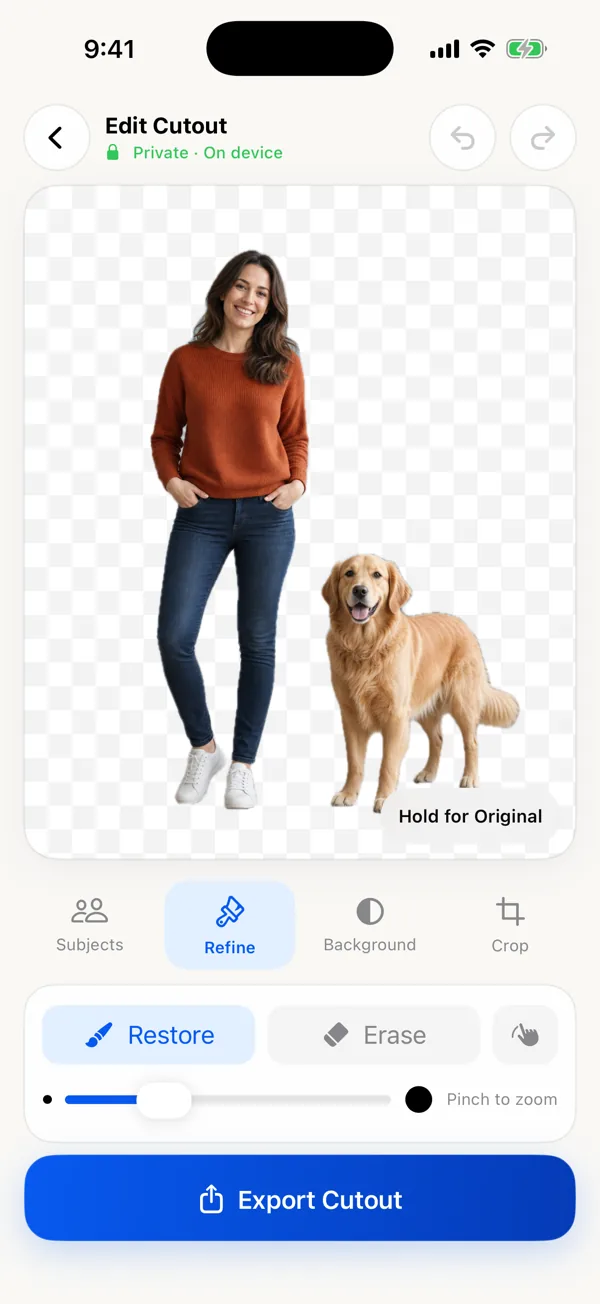
Editors commonly display transparency as a gray-and-white checkerboard. That pattern is not baked into the export. It is a visual convention so empty areas remain visible while you work.
Create and save the PNG file
- Choose the source photo and let the app create the foreground mask.
- Keep the subject or subjects you want.
- Open Refine and inspect narrow edges at a useful zoom.
- Leave Background set to Clear.
- Open Export and select PNG, or leave the file format on Auto when Clear is selected.
- Use Save to Photos for your photo library, or Share for a file destination. If Save to Files appears in your share sheet, choose it and keep that exported PNG as your working file.
PNG not saving with a transparent background? Check the file first
Some preview screens use white behind transparent pixels. Send the file into a design app or place it over a colored background to verify it. If the image was exported as PNG with Clear selected, a white-looking preview does not necessarily mean transparency was lost.
Another common problem happens after export. Messaging apps, social networks, and image optimizers may convert a PNG to JPEG. Share the file as a document when preserving the exact format matters.
On a narrow screen, scroll the table sideways to read each next step.
| What you see | Check | What to do next |
|---|---|---|
| White or black behind the cutout in a preview | Place the actual file over a colored layer in a transparency-aware editor. | If the color shows through, the preview was displaying a backing color; the file is still usable. |
| A white rectangle in the exported PNG | Was Background set to White instead of Clear? | Choose Clear and export again. PNG can contain opaque pixels too; the extension alone does not promise transparency. |
| A checkerboard appears inside the design | Did you use a screenshot or download an image with a checkerboard painted into it? | Return to the source and export the cutout itself. A screenshot records the checkerboard as ordinary pixels. |
| The file is now .jpg or .jpeg | Check the file after the sharing or upload step, not just before it. | Go back to the exported PNG and transfer the original file. Renaming JPEG to PNG does not restore its missing alpha channel. |
| Only the receiving app shows a white box | Test the same PNG in another editor over a colored layer. | If the original passes, the destination may flatten transparency. Check its supported formats or use a deliberately chosen solid background. |
Do not change your whole iCloud Photos setup based only on a white thumbnail. First test the exported file itself, then compare it with the copy received at the destination. That isolates an export problem from a preview or transfer problem.
Keep the original resolution
A fast editor can show a smaller preview while you work and return to the original image for the export render. This avoids making every brush movement operate on a large image while preserving the source dimensions in the finished file. Check the exported pixel dimensions when a marketplace, print workflow, or design template has a requirement.
Check the exported PNG before sending it
- Open the exported file in an app that supports transparency.
- Place it on a colored background. The new color should show through the removed area.
- Inspect hair and fur on both a light and a dark background to catch unwanted edge halos.
- If you see a fixed white rectangle, check that you chose Clear and PNG, then export again. Renaming a JPEG to .png does not add transparency.
Local Background Remover is a one-time app purchase with full-resolution export and no subscription. Get Background Remover: PNG Cutout on the App Store.
If Save to Photos does not work
The app asks for add-only Photos access when saving. If that permission is denied, use Share to save the exported file elsewhere, or review the app’s Photos permission in iOS Settings. You do not need to grant access to every photo just to save a cutout. See export and permissions support.
Product price, features and iOS requirement checked against the U.S. App Store listing on October 24, 2026.
When PNG is the wrong choice
PNG is excellent for cutouts, logos, graphics, and images that need transparency. A high-resolution photographic PNG can be much larger than a JPEG. If the background is final—white, black, or another solid color—and file size matters, JPEG may be more practical.